Solutions / Otoaccess / How to Use OtoAccess® Worklist HL7
How to Use OtoAccess® Worklist HL7

How to Use OtoAccess® Worklist HL7

Learn how to use OtoAccess® Worklist HL7.
Get a quote Find a distributor
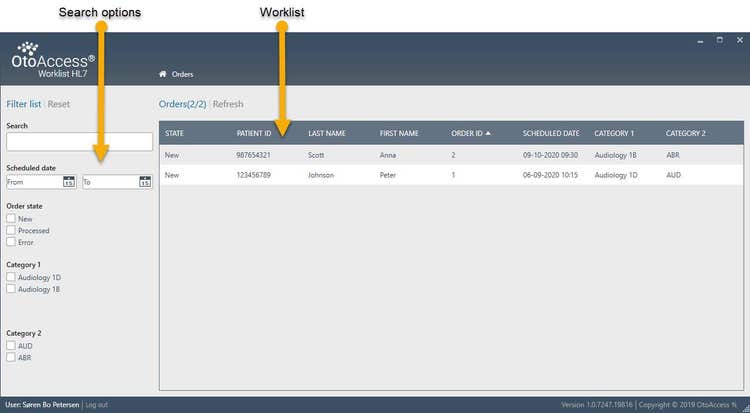
OtoAccess Worklist HL7 patient and appointment information. Search options on the left are indicated by a yellow arrow. The following search options are available: search field, scheduled date, order state, category 1 and category 2. The rest of the screen is populated with the actual patient appointment information, denoted 'worklist', including the following: state, patient id, last name, first name, order id, scheduled date, category 1 and category 2.

1. Choose patient

Patient and appointment information will automatically appear in the worklist. The information is sent from the main electronic patient journal system and will appear in state New.

Using the search options, you can filter the worklist by name, date, patient id, state or the configurable category fields.
Click on the relevant patient to continue.
Note: The search fields Category 1 and 2 can be labeled to your needs in the OtoAccess® Worklist HL7 server configuration.
In the Order details view you click the blue ‘Create new' button to choose a suite. Then perform your test(s).A test session will appear in the results list with the state unattached.
Note: Depending on your configuration, you may be able to perform multiple tests per patient.Click on the test that you want to send to the electronic patient journal system.
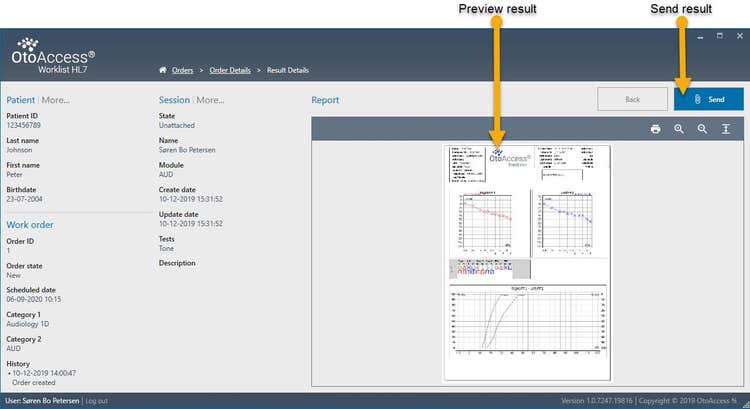
Preview the selected result and press send to deliver the result to the electronic patient journal system.Note: Depending on your configuration, you may be able to resend results.
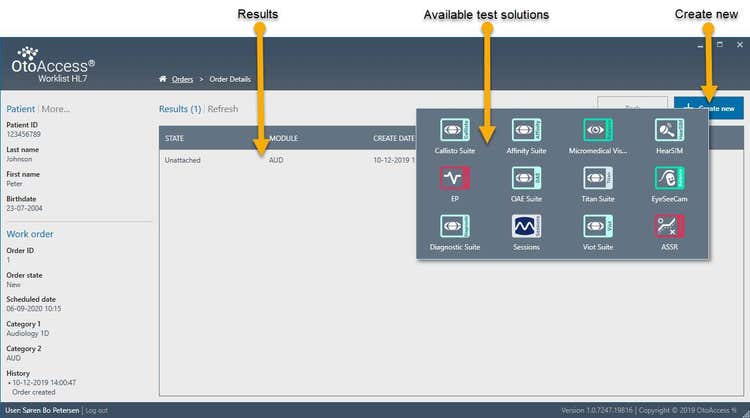
Order details overview in OtoAccess Worklist HL7. A list of details are displayed to the left, including the following: patient id, last name, first name, birthdate, order id, order state, scheduled date, category 1, category 2, and history. Three yellow arrows show where to find previous results, available software suites, and the 'create new' button.

Result details overview in OtoAccess Worklist HL7. Lists of details are displayed to the left concerning the patient, work order and session. Patient details include the following: patient id, last name, first name, and birthdate. Work order details include the following: order id, order state, scheduled date, category 1, category 2, and history. Session details include the following: state, name, module, create date, update date, tests, and description. Two yellow arrows in the report overview show where to find a preview of the results and the 'send' button.

Contact your local distributor

Our world-wide experts are ready to help you find the right solution.
Find a distributor