Solutions / Balance Testing Equipment / How to Perform the Sea Simulation Module
How to Perform the Sea Simulation Module
How to Perform the Sea Simulation Module
Learn how to perform the Sea Simulation module with the Virtualis MotionVR computerized dynamic posturography (CDP) system. Read more.
Equipment needed
This quick guide provides information on how to perform the Sea Simulation module on the Virtualis BalanceVR, PhysioVR, and MotionVR solutions. For additional information, please refer to the Sea Simulation user manual.
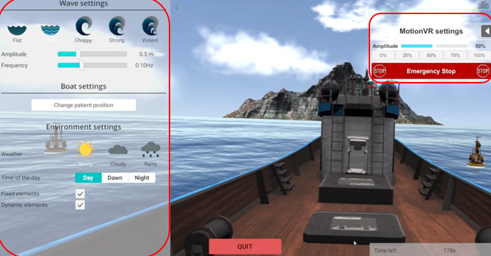
To view the equipment needed, click on the “i” icon in the upper right corner of the module. To perform the Sea Simulation module, you will need the VR headset. You also have the option to perform the module with the MotionVR.
Depending on the patient’s therapeutic goals, they can sit or stand to perform this module.
1. Open a patient profile.
2. Click on “Start a session” to access the module list.
3. Type “Sea Simulation” in the search bar. The first three letters are often enough.
4. Click on the Sea Simulation button to launch the module.
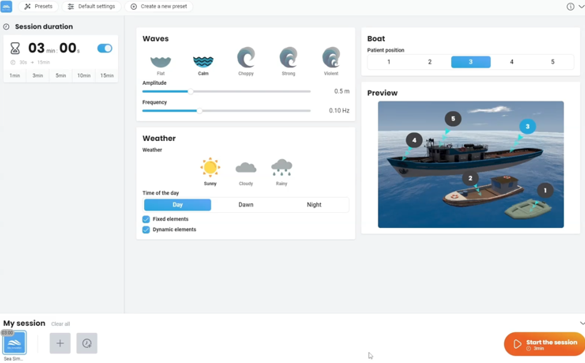
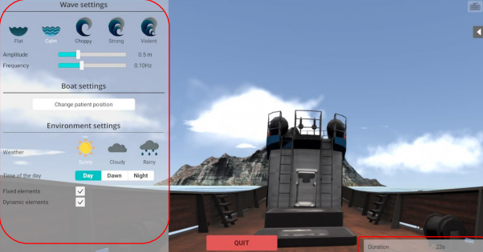
5. Select the initial settings based on your patient’s therapeutic goals.

Contact your local distributor
Our world-wide experts are ready to help you find the right solution.