Solutions / Audiometers / How to perform QuickSIN with Equinox Evo
How to perform QuickSIN with Equinox Evo
How to perform QuickSIN with Equinox Evo
Equinox Evo Support
Difficulty with hearing in background noise is a common complaint among hearing aid users. Therefore, the measurement of SNR loss (signal-to-noise ratio loss) is important because a person’s ability to understand speech in noise cannot be reliably predicted from the pure tone audiogram.
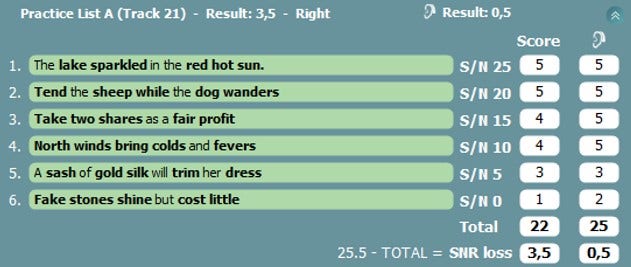
The QuickSIN test was developed to provide a quick estimate of SNR loss. A list of six sentences with five key words per sentence is presented in four-talker babble noise. The sentences are presented at pre-recorded SNR ratios which decrease in 5-dB steps from 25 (very easy) to 0 (extremely difficult).
The SNRs used are: 25, 20, 15, 10, 5 and 0, encompassing normal to severely impaired performance in noise.
Licensed AC440 Audiometry module
Calibrated headphones, insert phones or free-field speakers
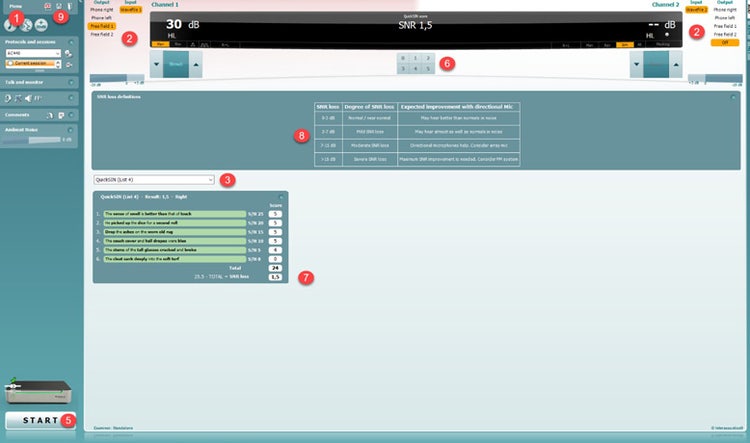
Open the AC440 module and enter the QuickSIN screen by selecting Menu | Tests | QuickSIN.
Select the output level. For most of the tracks, the channels are synchronised to ensure that the correct SNR level is achieved. Note: the ‘Speech and Babble’ lists are not synchronised and will require the user to manually alter these to ensure the correct SNR setting for the test.
Select a list in the dropdown.
Contact your local distributor
Our world-wide experts are ready to help you find the right solution.