Solutions / Audiometers / How to perform basic audiometry with Equinox Evo
How to perform basic audiometry with Equinox Evo
How to perform basic audiometry with Equinox Evo

Equinox Evo Support
This quick guide will focus on basic pure tone audiometry functions as well as a basic introduction to the various icons, tools and menus available.
Launch the Equinox Suite from Noah, OtoAccess®, or standalone.
Click on the eight note icon to launch the tone audiometry screen if tone audiometry is not the default screen.
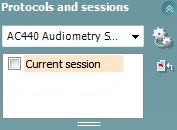
Select the desired audiometry protocol from the “Protocols and Sessions” drop down list.
Choose the transducer type and the stimulus type.
The table below shows how to choose the test frequency and intensity, and how to present the stimuli.
Turn on masking in Channel 2 by ensuring that the desired transducer is selected for the non-test ear.
Ensure that the word “Masking” is highlighted in orange.





Contact your local distributor
Our world-wide experts are ready to help you find the right solution.