Solutions / Audiometers / How to use Ambient Noise with Equinox Evo
How to use Ambient Noise with Equinox Evo
How to use Ambient Noise with Equinox Evo
Click hear to learn how to use the Ambient Noise feature with the Equinox Evo clinical audiometer.

Equinox Evo Support
The Ambient Noise feature allows you to monitor the test environment for noise during audiometric testing. It is ideal when testing in non-optimal conditions or when testing via tele-audiometry.
Knowledge of your testing conditions will allow you to assess the validity of your measurements ahead of making a diagnosis.
Ensure that you have the Ambient Noise microphone plugged into your Equinox Evo. The socket for this has been highlighted in the image below.
Launch your Equinox Evo Suite and go into the AC440 Module.
The Ambient Noise monitor can be seen in the left panel of the AUD screen when enabled in your test protocol.
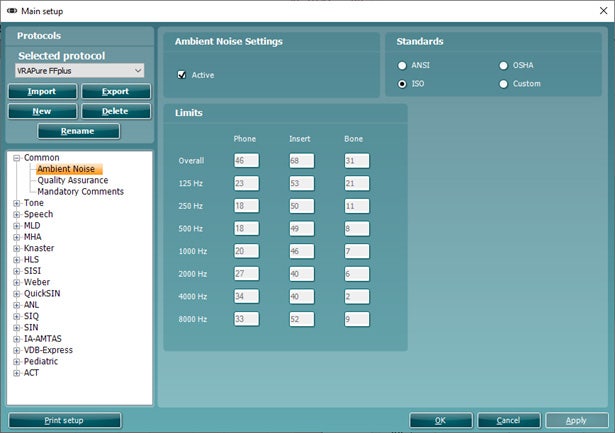
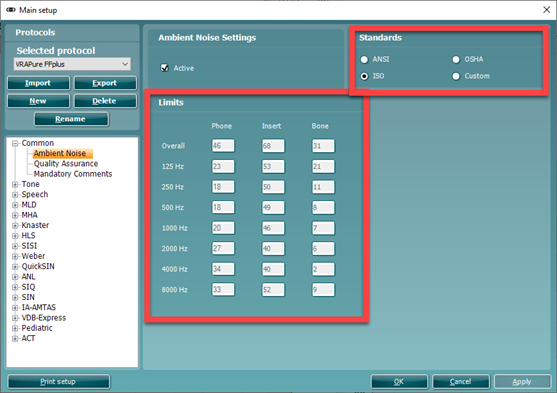
The below image shows the location of the Ambient Noise Settings in your Audiometry protocol.
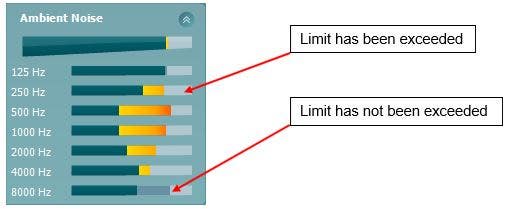
The Ambient Noise feature constantly shows the average noise level in the top bar and then individual frequency levels below. It will show darker bars (limits) and orange bars above this when the limit is exceeded, see example below.
The Ambient Noise feature operates according to specific guidance found in calibration standard documents. The applied settings can be found in the configuration of this feature in your protocol settings.
Contact your local distributor
Our world-wide experts are ready to help you find the right solution.