Solutions / Audiometers / How to perform the Alternate Binaural Loudness Balance (ABLB) test with Equinox Evo
How to perform the Alternate Binaural Loudness Balance (ABLB) test with Equinox Evo
How to perform the Alternate Binaural Loudness Balance (ABLB) test with Equinox Evo
Equinox Evo Support
Headphones or insert phones
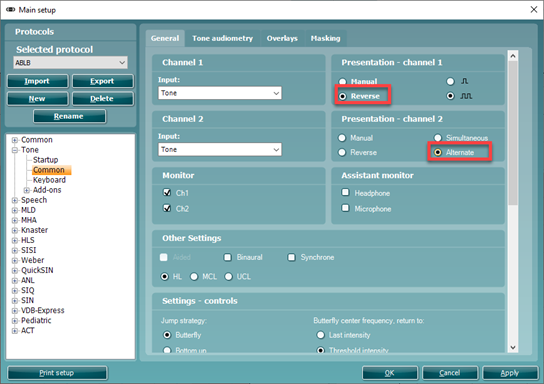
First, set up the protocol to do ABLB as this is not a separate test screen.
Go to Menu | Setup | AC440 setup.
Under Tone | Common, select ‘Reverse’ for channel 1 and ‘Alternate’ for channel 2. Click apply.
Figure 1: ABLB protocol setup.
Clarify the test procedure for the patient. Explain that they will now hear tones in both ears, which will be presented alternatively in each ear. The patient should then inform you when the two tones sound equal in intensity/loudness.
Perform the ABLB at frequencies where you assume recruitment. Set the intensity level on the impaired ear to 20 dB above the pure tone threshold using channel 2.
Present tones for both channels by holding in the tone switch for channel 1. Adjust the intensity level in the better ear until the perceived loudness is identical to the impaired ear using channel 1.
Contact your local distributor
Our world-wide experts are ready to help you find the right solution.